Fields for a new connection
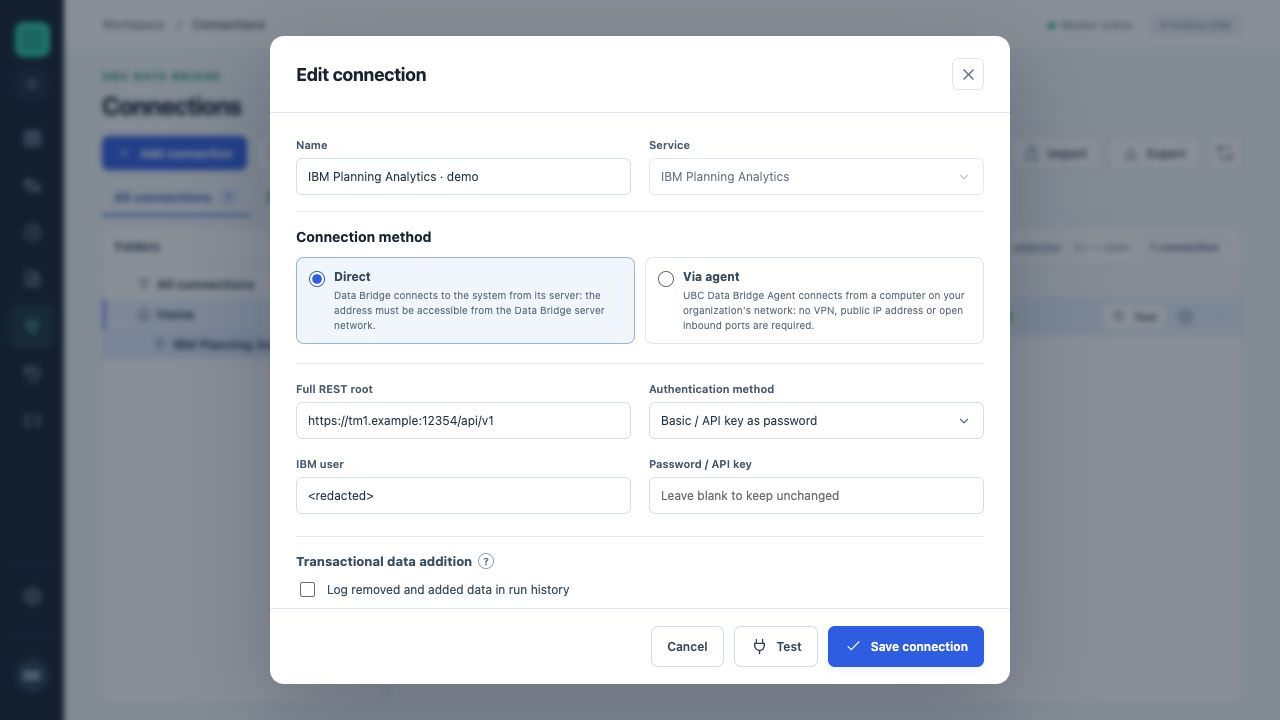
The form contains the REST root, authentication method and credential fields. The tm1.example address and user are illustrative.
- An empty password field for an existing connection uses the stored secret.
- “Test” and “Save connection” perform different actions.
- Open “Connections” and create an IBM Planning Analytics connection.
- Enter a recognizable name, such as “TM1 · test planning”.
- In “Full REST root”, enter the database address, for example
https://tm1.example.com:12354/api/v1. This is the TM1 REST address, not a Workspace book address. - Select an authentication method and complete the fields it displays.
- Click “Test”, review the report and save the connection.
The test uses the current form values without requiring a save and does not change cube values. For an existing connection, an empty secret field preserves the previous value.
Choosing an authentication method
| Method | Required information | Execution identity |
|---|---|---|
| Basic / API key as password | IBM user, password or an API key supported by the server | Saved user |
| CAM namespace | User, password, namespace | Saved user through CAMNamespace |
| Bearer token | Token | Token owner or context |
| Corporate login: username and password | Username, password, namespace, Cognos gateway; allowed login hosts if required | Saved corporate account |
| From user session | Namespace, Cognos gateway; personal interactive login | The user of the current UBC Data Bridge session |
A method appearing in the list does not mean a particular IBM server accepts it. The method must match your TM1 and corporate login configuration.
Address and certificate trust
The administrator allows the exact TM1 origin through PA_ALLOWED_ORIGINS, for example https://tm1.example.com:12354, without /api/v1. Standard mode validates the certificate. A private certificate authority is configured with file PA_CA_BUNDLE.
HTTPS is required to transmit CAMPassport. During normal exchange, the connection does not automatically follow redirects. This helps identify an incorrect REST root that returns a login page or proxy address instead of the API.
How to verify the result
A successful test confirms reachability and acceptance of the current credentials for the check performed. Next, open the list of required cubes or dimensions and then preview the source. A successful connection test alone does not confirm permission to write to every cell.
In the error report, review the stage, API address, response code, operation and “What to check” recommendations. Stored secrets are not returned to the browser; enter a new value to replace the password.