Administrator role
The system “Administrator” role always exists and has all permissions. It manages connections, sources, flow creation and import, roles, automated jobs and settings. Other roles are created for specific responsibilities.
Flow permissions
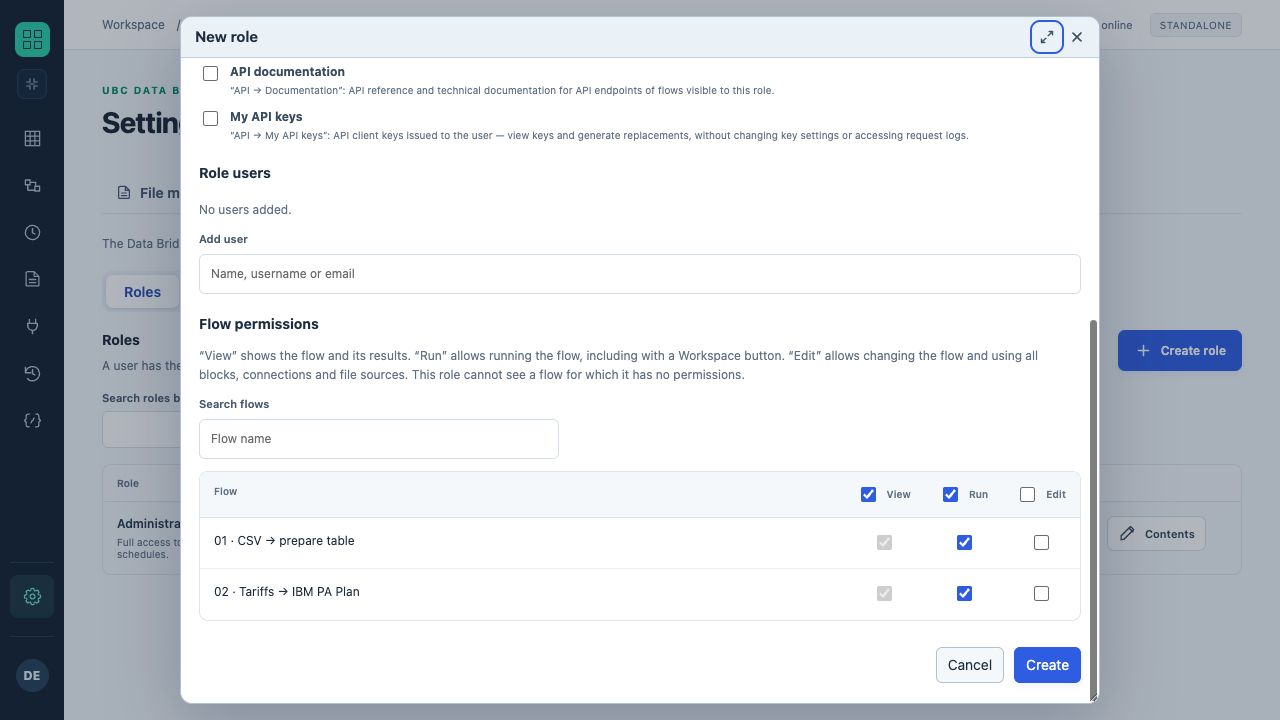
Example role form: viewing and running two training flows is allowed; editing is not selected. The role is shown before saving.
| Permission | Grants access to | Does not imply |
|---|---|---|
| View | The flow, its history and results. | Permission to edit or run. |
| Run | Running the flow, including through a Workspace button; includes viewing. | Permission to edit. |
| Edit | Modifying the flow and using existing blocks/connections/sources; includes viewing. | Permission to run or edit the connections themselves. |
Permissions from multiple roles are combined. A flow with no granted permission is hidden from the user. Access to a particular flow's history is checked against current permissions.
Where roles come from
| Login | Management |
|---|---|
| Local | The UBC Data Bridge administrator creates users and roles. |
| OIDC | The user appears after login; roles are linked to people or provider groups. |
| IBM CAM | Users and groups come from TM1; UBC Data Bridge roles have their own permissions. |
| UBC Analytics | Users, roles and membership come from UBC Analytics; UBC Data Bridge defines these roles' flow permissions. |
Access updates
Local permission changes apply immediately. IBM groups are checked periodically, every 60 seconds by default; OIDC groups are read at login, so a new session may be needed after changes. UBC Analytics mode uses a short permission cache, 10 seconds by default.
Assigning a role
- Open “Settings → Access → Roles”.
- Create a role and provide a description.
- Select flows and independently define view, run and edit permissions.
- Add people or provider groups; for UBC Analytics, change membership there.
- Test as a regular user.