Task and prerequisites
Read an API resource, extract the data.items array, retain open orders and produce Excel.
This example uses demonstration data and settings. Validate the expected result in your own environment before connecting production destinations. Identifiers demo_* are illustrative: select your own training connections or sources in the editor. The JSON below shows the block and connection structure, not a ready-to-transfer flow archive.
Example connection settings:
{
  "kind": "rest_api",
  "name": "Навчальні замовлення API",
  "options": {
    "base_url": "https://example.invalid/api",
    "auth": "none",
    "resource_path": "/orders",
    "method": "GET",
    "response_format": "json",
    "records_path": "data.items",
    "pagination": "none",
    "timeout": 60
  }
}
Training input data
{
  "data": {
    "items": [
      {
        "id": "A1",
        "status": "open",
        "total": 120
      },
      {
        "id": "A2",
        "status": "closed",
        "total": 60
      },
      {
        "id": "A3",
        "status": "open",
        "total": 90
      }
    ]
  }
}
Blocks, connections and exact settings
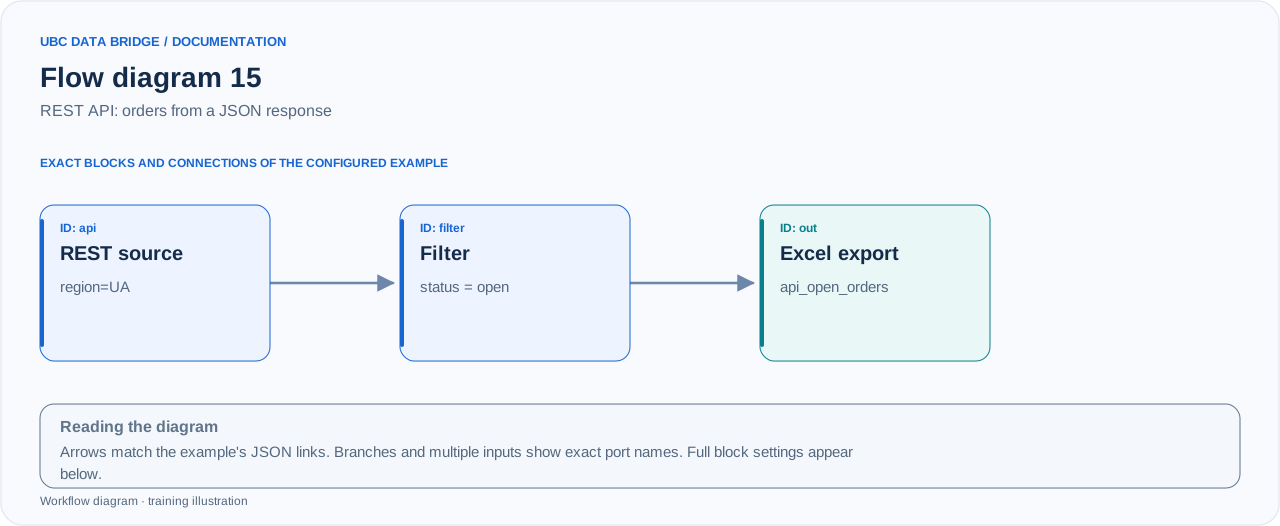
Example 15 topology: 3 blocks, 2 connections. Node identifiers and ports from the configured graph are preserved.
Add the listed blocks in the designer, open each block's properties and set these values. Names demo_* identify training sources and connections.
| Block | Setting |
|---|---|
| 1 Connection api |
|
| 2 Filtering filter |
|
| 3 Data export out |
|
Port connections
- api
out→ filterin - filter
out→ outin
Complete graph configuration as JSON
{
  "version": 3,
  "nodes": [
    {
      "id": "api",
      "type": "connection",
      "label": "api",
      "config": {
        "role": "source",
        "connection_id": "demo_api_orders",
        "external": {
          "extra_params": "region=UA"
        }
      }
    },
    {
      "id": "filter",
      "type": "filter",
      "label": "filter",
      "config": {
        "mode": "all",
        "predicates": [
          {
            "column": "status",
            "op": "eq",
            "value": "open",
            "numeric": false,
            "value_mode": "constant"
          }
        ]
      }
    },
    {
      "id": "out",
      "type": "export",
      "label": "out",
      "config": {
        "format": "xlsx",
        "filename": "api_open_orders",
        "destination": "download",
        "delimiter": ";",
        "timezone": "Europe/Kyiv"
      }
    }
  ],
  "edges": [
    {
      "source": "api",
      "target": "filter",
      "source_port": "out",
      "target_port": "in"
    },
    {
      "source": "filter",
      "target": "out",
      "source_port": "out",
      "target_port": "in"
    }
  ]
}
Expected result
| id | status | total |
|---|---|---|
| A1 | open | 120 |
| A3 | open | 90 |
If the test API returns the illustrated document, api_open_orders.xlsx will contain two orders with total=210.
Run and verify
- Configure your own test HTTP service returning the illustrated JSON; example.invalid is a placeholder address and is not expected to work.
- Create a REST API connection with the settings below, replace only the test-service address and configure the required authentication method.
- Check the connection preview, then run the flow and verify A1/A3.
Common errors
- Configure the resource and response handling in the connection; external.extra_params adds parameters for the specific block.
- Write one name=value parameter per line, without a leading ?.
- If the API returns multiple pages, pagination=none reads only one; change the policy to match your API contract.
- Do not put Authorization in ordinary headers: enter secrets in the connection's dedicated field.