Task and prerequisites
Split orders into priority and regular orders by amount, with a separate file for each branch.
This example uses demonstration data and settings. Validate the expected result in your own environment before connecting production destinations. Identifiers demo_* are illustrative: select your own training connections or sources in the editor. The JSON below shows the block and connection structure, not a ready-to-transfer flow archive.
Training input data
orders.csv
Order;Amount
O1;1200
O2;450
O3;1000
Blocks, connections and exact settings
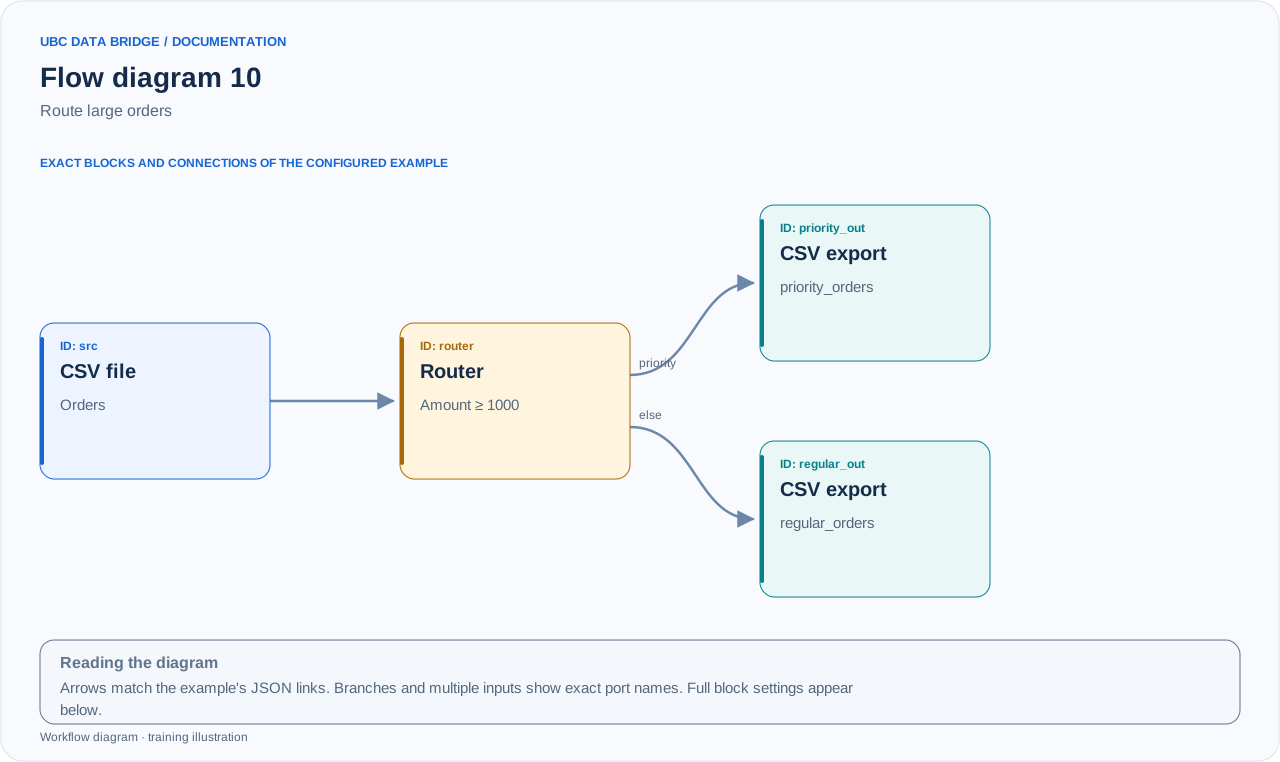
Example 10 topology: 4 blocks, 3 connections. Node identifiers and ports from the configured graph are preserved.
Add the listed blocks in the designer, open each block's properties and set these values. Names demo_* identify training sources and connections.
| Block | Setting |
|---|---|
| 1 File src |
|
| 2 Routing router |
|
| 3 Data export priority_out |
|
| 4 Data export regular_out |
|
Port connections
- src
out→ routerin - router
priority→ priority_outin - router
else→ regular_outin
Complete graph configuration as JSON
{
  "version": 3,
  "nodes": [
    {
      "id": "src",
      "type": "file",
      "label": "src",
      "config": {
        "role": "source",
        "source_id": "demo_orders",
        "options": {
          "sheet": "CSV",
          "range": "A1:B4",
          "header": true,
          "delimiter": ";"
        }
      }
    },
    {
      "id": "router",
      "type": "router",
      "label": "router",
      "config": {
        "mode": "first",
        "default_route": true,
        "routes": [
          {
            "id": "priority",
            "label": "Від 1000",
            "mode": "all",
            "predicates": [
              {
                "column": "Amount",
                "op": "gte",
                "value": 1000,
                "numeric": true,
                "value_mode": "constant"
              }
            ]
          }
        ]
      }
    },
    {
      "id": "priority_out",
      "type": "export",
      "label": "priority_out",
      "config": {
        "format": "csv",
        "filename": "priority_orders",
        "destination": "download",
        "delimiter": ";",
        "timezone": "Europe/Kyiv"
      }
    },
    {
      "id": "regular_out",
      "type": "export",
      "label": "regular_out",
      "config": {
        "format": "csv",
        "filename": "regular_orders",
        "destination": "download",
        "delimiter": ";",
        "timezone": "Europe/Kyiv"
      }
    }
  ],
  "edges": [
    {
      "source": "src",
      "target": "router",
      "source_port": "out",
      "target_port": "in"
    },
    {
      "source": "router",
      "target": "priority_out",
      "source_port": "priority",
      "target_port": "in"
    },
    {
      "source": "router",
      "target": "regular_out",
      "source_port": "else",
      "target_port": "in"
    }
  ]
}
Expected result
priority_orders.csv: O1=1200 and O3=1000. regular_orders.csv: O2=450. The 1000 boundary is included through gte.
Run and verify
- Connect priority_out specifically to output priority and regular_out to else.
- Check numeric=true so the comparison is numeric.
- Run and check that output row counts add up to the input count: 2+1=3.
Common errors
- gt instead of gte would send an amount of 1000 to else.
- mode=all with several overlapping routes can copy a row into multiple branches.
- If no row reaches a route, its export may be skipped; a missing file does not necessarily indicate an error.