Task and prerequisites
Start one training TI process with a fixed year and a scenario chosen in the execution wizard.
This example uses demonstration data and settings. Validate the expected result in your own environment before connecting production destinations. Identifiers demo_* are illustrative: select your own training connections or sources in the editor. The JSON below shows the block and connection structure, not a ready-to-transfer flow archive.
Training input data
trigger.csv
Run
demo
Blocks, connections and exact settings
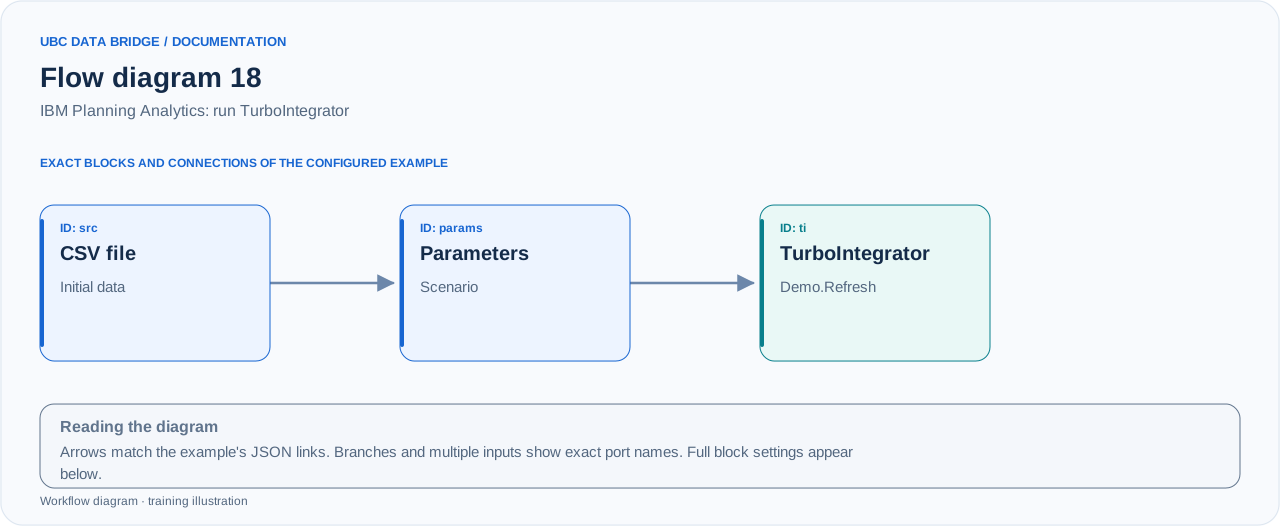
Example 18 topology: 3 blocks, 2 connections. Node identifiers and ports from the configured graph are preserved.
Add the listed blocks in the designer, open each block's properties and set these values. Names demo_* identify training sources and connections.
| Block | Setting |
|---|---|
| 1 File src |
|
| 2 Run parameters params |
|
| 3 Connection ti |
|
Port connections
- src
out→ paramsin - params
out→ tiin
Complete graph configuration as JSON
{
  "version": 3,
  "nodes": [
    {
      "id": "src",
      "type": "file",
      "label": "src",
      "config": {
        "role": "source",
        "source_id": "demo_ti_trigger",
        "options": {
          "sheet": "CSV",
          "range": "A1:A2",
          "header": true,
          "delimiter": ";"
        }
      }
    },
    {
      "id": "params",
      "type": "parameters",
      "label": "params",
      "config": {
        "wizard": true,
        "title": "Перерахунок сценарію",
        "fields": [
          {
            "name": "Scenario",
            "kind": "text",
            "required": true,
            "value": "Budget",
            "label": "Сценарій"
          }
        ]
      }
    },
    {
      "id": "ti",
      "type": "connection",
      "label": "ti",
      "config": {
        "role": "target",
        "connection_id": "demo_pa",
        "target_mode": "process",
        "process": "Demo.Refresh",
        "process_parameters": [
          {
            "name": "pYear",
            "kind": "constant",
            "value": 2026
          },
          {
            "name": "pScenario",
            "kind": "parameter",
            "parameter_block": "params",
            "parameter": "Scenario"
          }
        ]
      }
    }
  ],
  "edges": [
    {
      "source": "src",
      "target": "params",
      "source_port": "out",
      "target_port": "in"
    },
    {
      "source": "params",
      "target": "ti",
      "source_port": "out",
      "target_port": "in"
    }
  ]
}
Expected result
{
  "Parameters": [
    {
      "Name": "pYear",
      "Value": 2026
    },
    {
      "Name": "pScenario",
      "Value": "Budget"
    }
  ]
}
One call to Demo.Refresh with two parameters is expected. The business result depends on the TI process logic; UBC Data Bridge itself does not determine which cells it changes.
Run and verify
- In IBM PA, create or select training process Demo.Refresh with parameters pYear (numeric) and pScenario (text).
- Enter Budget in the wizard. Check parameters before execution.
- The process must not execute during simulation; use flow execution for an actual run.
- Check the process status and log in IBM PA; expect one call, not one per row.
Common errors
- Correct unknown process parameters before running; do not add parameters blindly.
- Cube mapping is not configured for target_mode=process.
- CompletedWithErrors is a process error; a successful HTTP connection alone does not mean TI succeeded.