Task and prerequisites
Update an existing product by its sku key and add a missing product to a training SQL table.
This example uses demonstration data and settings. Validate the expected result in your own environment before connecting production destinations. Identifiers demo_* are illustrative: select your own training connections or sources in the editor. The JSON below shows the block and connection structure, not a ready-to-transfer flow archive.
A training SQL database connection with a supported connector and read/write permissions on demo_products is required. The example itself does not execute a SQL write.
Training input data
Initial state of demo_products:
| sku | name | price |
|---|---|---|
| T01 | Tea | 10 |
| C01 | Coffee | 20 |
products.csv
sku;name;price
T01;Tea premium;12.5
J01;Juice;8
Blocks, connections and exact settings
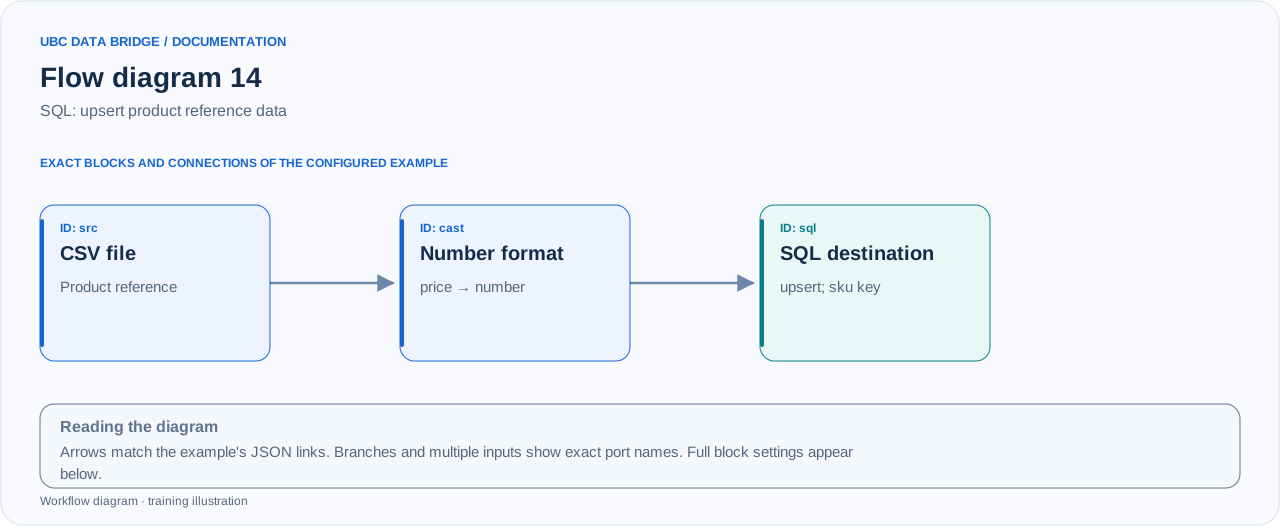
Example 14 topology: 3 blocks, 2 connections. Node identifiers and ports from the configured graph are preserved.
Add the listed blocks in the designer, open each block's properties and set these values. Names demo_* identify training sources and connections.
| Block | Setting |
|---|---|
| 1 File src |
|
| 2 Number and date formats cast |
|
| 3 Connection sql |
|
Port connections
- src
out→ castin - cast
out→ sqlin
Complete graph configuration as JSON
{
  "version": 3,
  "nodes": [
    {
      "id": "src",
      "type": "file",
      "label": "src",
      "config": {
        "role": "source",
        "source_id": "demo_products_upsert",
        "options": {
          "sheet": "CSV",
          "range": "A1:C3",
          "header": true,
          "delimiter": ";"
        }
      }
    },
    {
      "id": "cast",
      "type": "number_format",
      "label": "cast",
      "config": {
        "rules": [
          {
            "kind": "number",
            "field": "price",
            "decimal_in": ".",
            "thousands_in": "",
            "extract": false,
            "invalid": "error",
            "output": "number"
          }
        ]
      }
    },
    {
      "id": "sql",
      "type": "connection",
      "label": "sql",
      "config": {
        "role": "target",
        "connection_id": "demo_sql",
        "external": {
          "object": "demo_products",
          "write_mode": "upsert",
          "key_fields": [
            "sku"
          ]
        }
      }
    }
  ],
  "edges": [
    {
      "source": "src",
      "target": "cast",
      "source_port": "out",
      "target_port": "in"
    },
    {
      "source": "cast",
      "target": "sql",
      "source_port": "out",
      "target_port": "in"
    }
  ]
}
Expected result
| sku | name | price |
|---|---|---|
| T01 | Tea premium | 12.5 |
| C01 | Coffee | 20 |
| J01 | Juice | 8 |
T01 is updated, J01 is added and C01 remains. The sku key must be unique in the training table.
Run and verify
- Prepare training table demo_products and check its initial 2 rows.
- Verify column types: sku/name are text, price is numeric; the cast block converts CSV text to a number.
- Run pre-validation, then execute; read the table and compare the 3 illustrated rows.
- Repeat the same run: upsert by sku should update the same products without creating duplicates.
Common errors
- insert instead of upsert will not update T01 and may violate the unique key.
- Correct empty or duplicate sku values in the input file before writing.
- Do not substitute a production table for the training table without checking its schema and write permissions.