Where permissions are configured
The computer administrator configures Agent policy in the local settings window. On Windows, open Start → UBC Data Bridge Agent → Agent settings; on macOS, open Applications → UBC Data Bridge Agent. Changes require administrator access. Use the interface: it validates values and identifies any field containing an error. On Linux, open the settings as described in the Agent package instructions.
Data Bridge can view these settings but cannot change them. Under Settings → Access → Agents, Get from Agent refreshes computer, network and resource information. Passwords and private keys are not transferred. Allow only the resources required by the relevant flows.
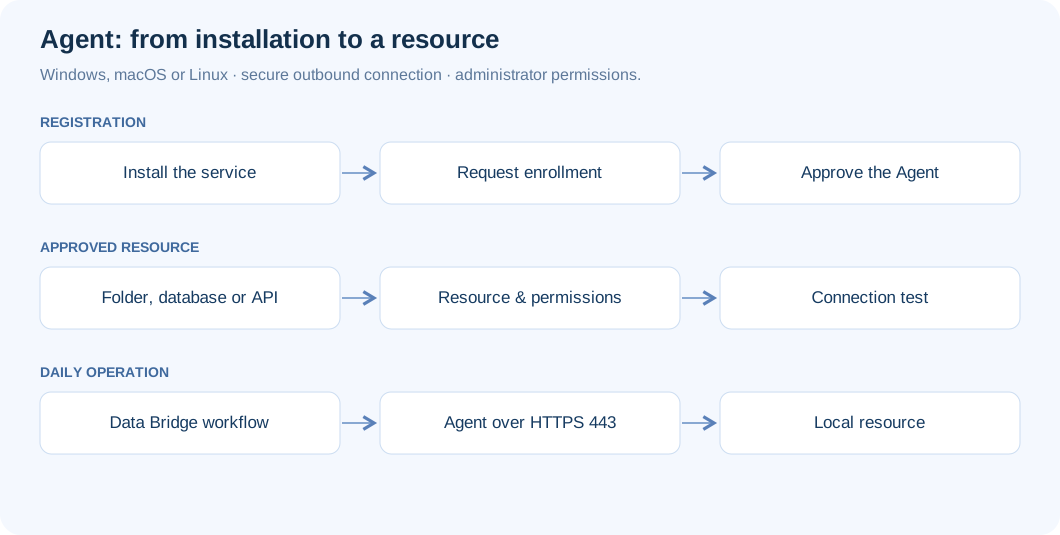
Databases: host and port
- In Resources, add Host and port. Give it a clear name and an identifier using lowercase Latin letters, numbers, hyphens or underscores.
- Enter the exact server hostname or IP address and required port. For example,
db.localwith5432illustrates PostgreSQL; these are not your network’s actual connection details. - Save and test the resource. Then configure the corresponding connector and credentials in Data Bridge.
This route applies to PostgreSQL, MySQL, SQL Server, Azure SQL, Oracle, Db2, Redis and SMTP. Port lists and CIDR networks are supported, but exact addresses are easier to control. When a hostname is permitted through a CIDR rule, all resolved IP addresses must fall within that network.
SQL Server through the Agent requires an explicit port: leave the instance name empty and specify the server port. TCP permission does not grant database read or write privileges; those belong to the database user. ODBC does not use the Agent route; choose a dedicated database connector.
APIs: base URL and methods
Add an API resource with a base address such as https://erp.local/api/. Replace this illustrative internal address with the actual one. Only that URL and paths beneath it are allowed. Do not include credentials, query parameters or .. in the base address.
Start with GET and HEAD. Add POST, PUT, PATCH or DELETE only for required operations; some APIs also use POST for read queries. For an internal certificate, configure a trusted certificate authority PEM file or a verified SHA-256 fingerprint. The default request timeout is 300 seconds, configurable from 1 to 3600 seconds.
For IBM Planning Analytics, specify your server’s REST API root and the methods the flow needs. HTTP Basic, CAM namespace and Bearer authentication can use the Agent. Cognos Gateway corporate sign-in and user-session connections use the direct route.
Folders: boundaries and operations
Add a Folder resource with an absolute local path or a network path visible to the service. Reading is included; create permits new files and folders, write overwrites existing files, rename renames or moves within the resource, and delete removes items. Do not enable every permission when the flow only reads reports.
Restrict filenames using masks such as *.xlsx and *.csv, and set a maximum file size. Zero means the Agent’s global limit. Resource roots must not be nested. Traversal through .., symbolic links or NTFS junctions outside the permitted folder is blocked.
Grant operating system permissions separately. The Windows and macOS guides cover UNC paths, system mounts and protected folders. FTP/FTPS does not use the Agent; arrange access through an approved folder. File writes complete after size and SHA-256 verification; files changed since reading are not overwritten. For Linux, configure service-account permissions and persistent network mounts using the Linux resource guide.
The network route to Data Bridge
Allow outbound TCP 443 to your Data Bridge installation’s HTTPS address and the necessary ports from the Agent to local resources. DNS must resolve required names; in a proxy network, the proxy may resolve the external hostname. The Agent route needs no inbound firewall rules.
Start with automatic mode under Connection. It tries available system routes, WebSocket and HTTPS requests. In manual mode, select WSS or HTTPS and a system, direct or manually configured proxy route. Proxies must support long-lived connections with an idle timeout of at least 60 seconds. WSS requires Upgrade: websocket support.
Proxy authentication and trusted certificates
Enter the proxy URL without credentials or a path. Supply username, domain and password in separate fields. Windows supports system Negotiate/NTLM authentication, including the computer account; stored passwords are protected separately with DPAPI. macOS supports NTLMv2 with a username and password, but not Negotiate/Kerberos. Its secrets file is accessible only to administrators and the service. On Linux, confirm the proxy authentication supported by your package with the administrator; see Linux preparation.
If corporate equipment inspects TLS, add its approved root certificate PEM as an Additional certificate authority; the service must be able to read the file. Do not disable TLS verification. Outer transport defaults to a TLS 1.2 minimum, configurable to 1.3; the inner channel always uses TLS 1.3.
Validate before running production flows
Run Diagnostics → Run diagnostics, test each resource, then select Test on the Data Bridge connection. Resource checks do not change data; a folder write test needs separate confirmation. Confirm that required operations succeed while unnecessary methods and folders remain unavailable.
Default limits are 16 concurrent operations, 1200 operations per minute and a 4096 MB maximum file. These are configuration limits, not throughput guarantees. Match them to the computer and target system’s capacity. Keep auditing enabled and investigate failures using the troubleshooting guide.