Choose who initiates the exchange
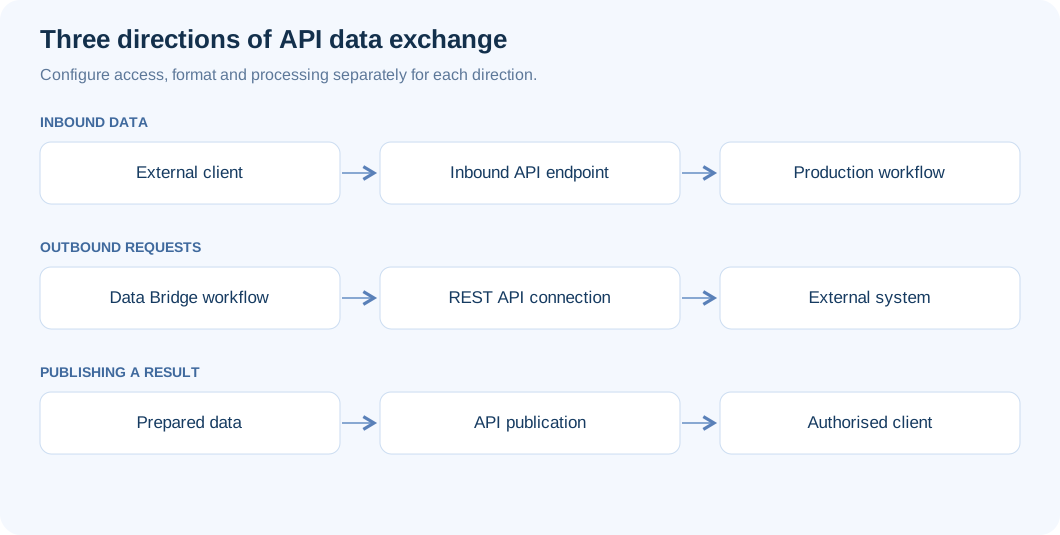
The UBC Data Bridge API connects external systems to controlled flows. First decide which side initiates the request and what result it needs. This determines the appropriate direction of the “REST API” connection and avoids unnecessary intermediary code.
- Call an external API: Data Bridge reads records from, or sends rows to, another service.
- Receive data in Data Bridge: a partner submits a table or file; an accepted delivery starts a Production flow.
- Publish flow data: a consumer reads a prepared dataset or requests the result of a new run.
Prepare the environment and owners
The administrator checks the installation's HTTPS address, API routing through the proxy and “Settings → API → API limits → Data Bridge API enabled”. Assign an integration owner, a flow author and the user who will own the API key. Destinations need actual permissions on target objects: API access alone does not grant access to a table, cube or mail server.
Begin in a test environment with a small dataset containing no personal data. Agree on field schema, record keys, accepted formats, expected response time and retry behavior. Identify who will reconcile a partial result.
Configure the connection and flow
- In “Connections”, create “REST API”, choose the direction and give it a name distinguishing test from production.
- Complete the direction-specific fields. An external service needs an address, method and authentication; your own endpoint needs an API version, identifier and response rules.
- Add the corresponding designer block: a source/destination connection, “API input data” or “API data publication”.
- Configure transformations, checks and destinations. Preview tables and run a simulation.
- Save and publish Production. Client requests use the published flow; saving a draft does not replace it.
Addresses and versions
An API version is part of the endpoint address, such as v1 or v1.1. It is separate from the UBC Data Bridge 2.1.1 product version. Copy the complete address from the form: an installation may include a /databridge prefix, environment code and a separate Designer path. Endpoints and keys from different environments are not interchangeable.
Core routes include POST /api/v1/inbound/orders for intake; GET /api/v1/data/stock for a dataset; GET /api/v1/ping for key and clock checks; and GET /api/v1/flows for available flows. The orders and stock identifiers are examples to create in your installation.
Separate key scope and user permissions
For a protected inbound endpoint, create an API client with “Write” permission on the required flow; reading needs “Read”. A key acts as its owner and never expands that user's permissions. Send it through Authorization: Bearer or X-API-Key, never in a URL. When HMAC is enabled, every request also needs its own timestamp and signature.
Public access applies only to a deliberately enabled publication endpoint. It does not expose intake, history or technical documentation. Key rules and a signing example are in the API client guide.
Verify the entire cycle
A successful HTTP request does not prove that the business operation has completed. An inbound endpoint may return 202: retain the delivery identifier and follow Location. For on-demand publication, use next to await the same run. Compare status, row counts and a specific record in the target system.
Separately test an invalid field, missing permission, repeated idempotency key and exceeded limit. In “Settings → API → Request audit”, locate the request by flow or connection. Match it to the run log and determine a safe retry scope after any partial or unconfirmed write.
Continue with the relevant guide
Receiving data and files covers schemas, deliveries and callbacks. Calling external APIs explains reading, pagination and writing. Publishing data covers freshness modes and parameters. The endpoint technical reference guide explains how to hand configuration details to an integrator.