Task and prerequisites
Let the operator approve or reject a set of requests and return to a shared export after the selected action.
This example uses demonstration data and settings. Validate the expected result in your own environment before connecting production destinations. Identifiers demo_* are illustrative: select your own training connections or sources in the editor. The JSON below shows the block and connection structure, not a ready-to-transfer flow archive.
Training input data
requests.csv
Request;Status
R1;Draft
R2;Draft
Blocks, connections and exact settings
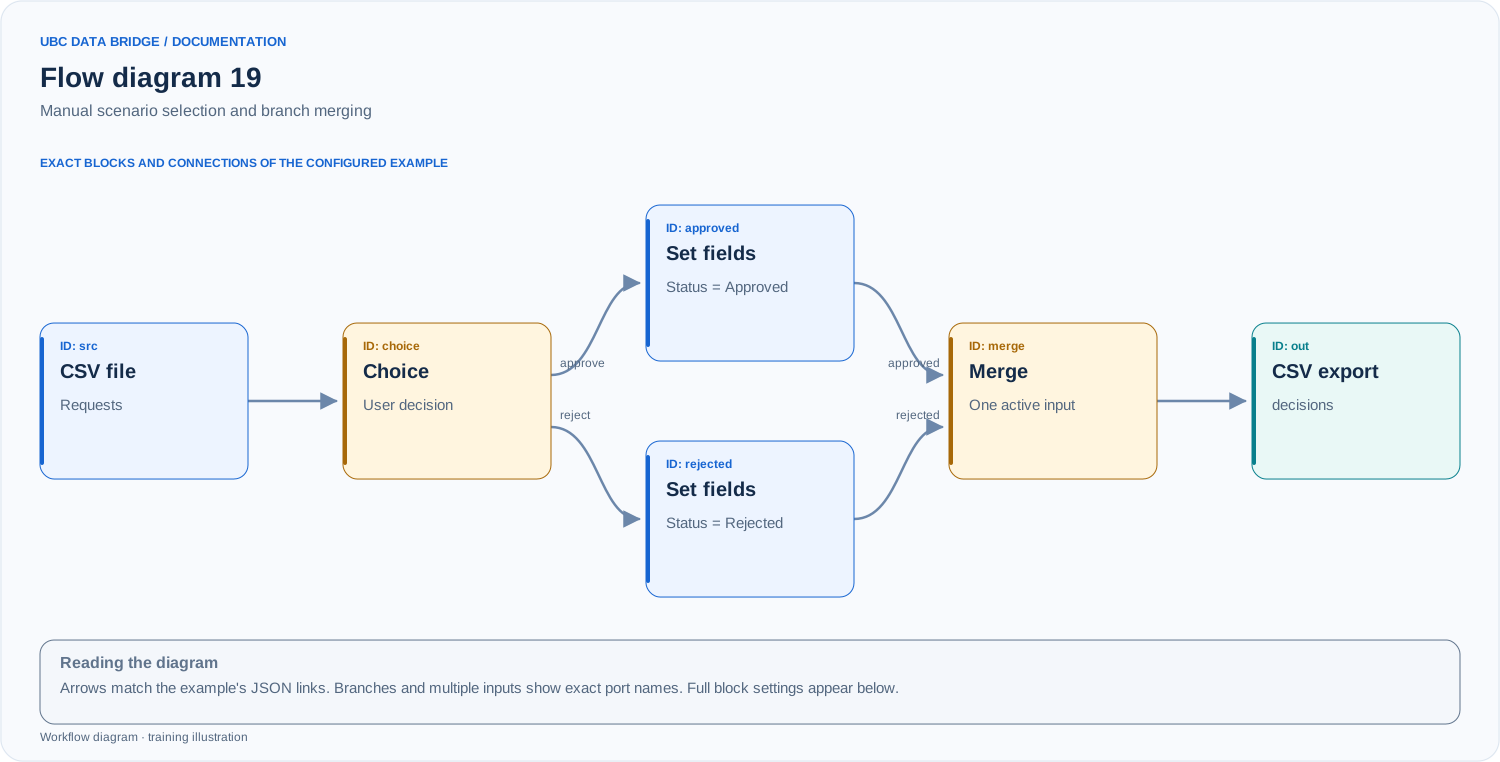
Example 19 topology: 6 blocks, 6 connections. Node identifiers and ports from the configured graph are preserved.
Add the listed blocks in the designer, open each block's properties and set these values. Names demo_* identify training sources and connections.
| Block | Setting |
|---|---|
| 1 File src |
|
| 2 Choice choice |
|
| 3 Set field values approved |
|
| 4 Set field values rejected |
|
| 5 Merge branches merge |
|
| 6 Data export out |
|
Port connections
- src
out→ choicein - choice
approve→ approvedin - choice
reject→ rejectedin - approved
out→ mergeapproved - rejected
out→ mergerejected - merge
out→ outin
Complete graph configuration as JSON
{
  "version": 3,
  "nodes": [
    {
      "id": "src",
      "type": "file",
      "label": "src",
      "config": {
        "role": "source",
        "source_id": "demo_approval",
        "options": {
          "sheet": "CSV",
          "range": "A1:B3",
          "header": true,
          "delimiter": ";"
        }
      }
    },
    {
      "id": "choice",
      "type": "choice",
      "label": "choice",
      "config": {
        "title": "Рішення щодо набору заявок",
        "options": [
          {
            "id": "approve",
            "label": "Погодити"
          },
          {
            "id": "reject",
            "label": "Відхилити"
          }
        ],
        "wizard": true
      }
    },
    {
      "id": "approved",
      "type": "set_fields",
      "label": "approved",
      "config": {
        "assignments": [
          {
            "field": "Status",
            "source": "constant",
            "value_type": "text",
            "value": "Approved"
          }
        ]
      }
    },
    {
      "id": "rejected",
      "type": "set_fields",
      "label": "rejected",
      "config": {
        "assignments": [
          {
            "field": "Status",
            "source": "constant",
            "value_type": "text",
            "value": "Rejected"
          }
        ]
      }
    },
    {
      "id": "merge",
      "type": "merge",
      "label": "merge",
      "config": {
        "inputs": [
          {
            "id": "approved",
            "label": "Погоджено"
          },
          {
            "id": "rejected",
            "label": "Відхилено"
          }
        ],
        "mode": "single"
      }
    },
    {
      "id": "out",
      "type": "export",
      "label": "out",
      "config": {
        "format": "csv",
        "filename": "decisions",
        "destination": "download",
        "delimiter": ";",
        "timezone": "Europe/Kyiv"
      }
    }
  ],
  "edges": [
    {
      "source": "src",
      "target": "choice",
      "source_port": "out",
      "target_port": "in"
    },
    {
      "source": "choice",
      "target": "approved",
      "source_port": "approve",
      "target_port": "in"
    },
    {
      "source": "choice",
      "target": "rejected",
      "source_port": "reject",
      "target_port": "in"
    },
    {
      "source": "approved",
      "target": "merge",
      "source_port": "out",
      "target_port": "approved"
    },
    {
      "source": "rejected",
      "target": "merge",
      "source_port": "out",
      "target_port": "rejected"
    },
    {
      "source": "merge",
      "target": "out",
      "source_port": "out",
      "target_port": "in"
    }
  ]
}
Expected result
After selecting “Approve”, decisions.csv contains R1/Approved and R2/Approved; the rejected branch is skipped. After selecting “Reject”, both statuses are Rejected. This is one decision for the entire input dataset.
Run and verify
- Run the flow interactively and select “Approve”.
- Verify two updated requests, one active branch and a successful merge.
- Run again with “Reject” and verify both Rejected statuses.
Common errors
- Choice always requires a user response; it is unsuitable for unattended execution.
- Merge single expects one active branch; use Union to append two tables simultaneously.
- Do not confuse a manual choice of one scenario with Router, which distributes rows according to conditions.