Purpose
Any HTTP service: read records (JSON, XML, CSV/TSV, JSON Lines) and send rows (JSON, XML, form data, CSV). One connection represents one API resource and request method; create another connection for a different resource or method.
Connection fields
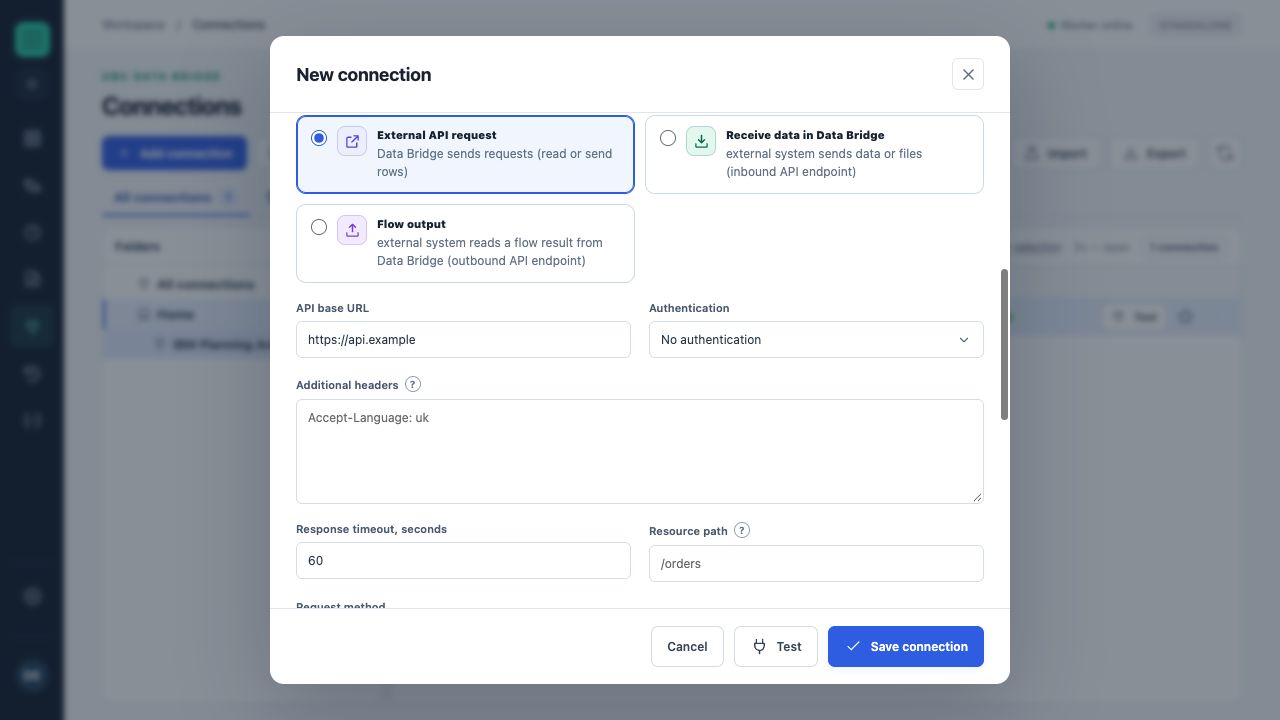
The upper part of the REST API form: name, service, base address, authentication and additional headers. api.example is a training address.
| Field | Rule and default value | Explanation |
|---|---|---|
API base addressbase_url | Required | Set the value according to your service configuration. |
Authenticationauth | As configured Default: none | none — No authenticationbasic — Basic (username and password)bearer — Bearer tokenapi_key — API key in a headeroauth2 — OAuth 2.0 client credentials |
Userusername | As configured | Shown when: auth = basic |
API key headerheader_name | As configured Default: X-API-Key | Shown when: auth = api_key |
Token endpoint addresstoken_url | As configured | Shown when: auth = oauth2 |
Client IDclient_id | As configured | Shown when: auth = oauth2 |
Scope (optional)scope | As configured | Shown when: auth = oauth2 |
Additional headersheaders | As configured | One per line: “Name: value”. Put secrets in the secret field, not here. |
Response timeout, secondstimeout | As configured Default: 60Range: 1–600 | Set the value according to your service configuration. |
Resource pathresource_path | As configured | Relative to the base address, without query parameters (? …). For individual requests, a row field can be inserted into the path: /orders/{{Number}}. |
Request methodmethod | As configured Default: GET | GET — GET — readingPOST — POST — reading with a request body or sending rowsPUT — PUT — sending rows (replacement)PATCH — PATCH — sending rows (update) |
Base query parametersquery_params | As configured | Added to every request using this connection. One per line: “name=value” or just “name” (for example, json). Values are encoded automatically. A source block can add its own parameters. |
Request body formatrequest_format | As configured Default: json | For sending rows and for a POST read-request body.json — JSONxml — XMLform — Form (application/x-www-form-urlencoded)csv — CSV — delimited textShown when: method = POST, PUT, PATCH |
Request bodybody | As configured | Only for POST reading, in the selected body format (for form data, one “name=value” per line). When sending, table rows form the request body and this field is unused. Shown when: method = POST |
XML row elementxml_record | As configured Default: record | Each row is sent as an element with this name; columns become its child elements. Shown when: method = POST, PUT, PATCH, request_format = xml |
Response formatresponse_format | As configured Default: auto | auto — Detect automatically (from Content-Type)json — JSONxml — XMLcsv — CSV/TSV — delimited textjsonl — JSON Lines (NDJSON) — one JSON object per lineShown when: method = GET, POST |
Response encodingresponse_encoding | As configured Default: auto | Automatic: from Content-Type or the XML declaration; otherwise UTF-8.auto — Automaticutf-8 — UTF-8windows-1251 — Windows-1251iso-8859-1 — ISO-8859-1 (Latin-1)Shown when: method = GET, POST |
CSV delimitercsv_delimiter | As configured Default: comma | comma — Comma ( , )semicolon — Semicolon ( ; )tab — Tab (TSV)pipe — Vertical bar ( | )Availability depends on the request method and format. |
The response's first CSV row contains column namescsv_header | As configured Default: True | Shown when: method = GET, POST, response_format = csv |
Record path in the responserecords_path | As configured | JSON: a dotted path (data.items); empty means a record array or an object containing one array. XML: an element path from the root (./item, ./data/item, .//item); empty means repeating elements: the largest group of identical elements (for a simple list, the root's children). Nested objects and elements become “a.b” columns; XML attributes become “@name”. Shown when: method = GET, POST, response_format = auto, json, xml |
Include parent-element attributes in XML recordsxml_ancestors | As configured Default: True | Each record receives attributes of elements between the root and that record. For example, in ECB exchange rates, the Cube.Cube.@time date appears in every currency row. The column name is the element path from the root plus “@attribute”; a field on the record itself takes precedence. Shown when: method = GET, POST, response_format = auto, xml |
Response pagespagination | As configured Default: none | none — One responsenext_link — Next-page link in the response body (JSON, XML)link_header — Next-page link in the Link header (rel="next")page — Page number in a parameteroffset — Offset in a parameterShown when: method = GET, POST |
Next-page link pathnext_link_path | As configured Default: next | JSON: a dotted path; XML: an element path (element text) or “path@attribute”. The link must lead to the same server. Shown when: method = GET, POST, pagination = next_link |
Page-number or offset parameterpage_param | As configured Default: page | Shown when: method = GET, POST, pagination = page, offset |
Page-size parameter (optional)size_param | As configured | Shown when: method = GET, POST, pagination = page, offset |
Page sizepage_size | As configured Default: 100Range: 1–10000 | Shown when: method = GET, POST, pagination = page, offset |
First page numberfirst_page | As configured Default: 1Range: 0–1 | Shown when: method = GET, POST, pagination = page |
Maximum pagesmax_pages | As configured Default: 100Range: 1–10000 | Shown when: method = GET, POST, pagination = next_link, link_header, page, offset |
How to send rowssend_mode | As configured Default: row | For destinations. JSON: a row is a “column: value” object and a batch is an object array. XML: a row element, with a batch inside a root element. Form data: individual requests only. CSV: a header row followed by value rows.row — One request per rowbatch — Batches — several rows in one requestShown when: method = POST, PUT, PATCH |
Rows per batchbatch_size | As configured Default: 100Range: 1–10000 | Shown when: method = POST, PUT, PATCH, send_mode = batch |
Array key in the JSON batch body (optional)batch_key | As configured | Shown when: method = POST, PUT, PATCH, send_mode = batch, request_format = json |
XML batch root elementxml_root | As configured Default: records | Shown when: method = POST, PUT, PATCH, send_mode = batch, request_format = xml |
Password, token, key or client secretsecret | Separate protected field | The secret is not displayed after saving. An empty field in an existing connection preserves its current secret. |
Setup and validation
- Create a connection and give it a clear name.
- Complete required fields and the separate secret field.
- Run “Test” and read the diagnostics.
- Save the connection and select it in the appropriate flow block.
A successful test does not replace checking access to the required object and specific write mode.
Use in a flow
Server and account settings are stored in the connection. The specific object, fields and flow behavior are defined in the block. Go to data-handling rules →