Task and prerequisites
Compare a request amount with its department's individual limit rather than a single constant for everyone.
This example uses demonstration data and settings. Validate the expected result in your own environment before connecting production destinations. Identifiers demo_* are illustrative: select your own training connections or sources in the editor. The JSON below shows the block and connection structure, not a ready-to-transfer flow archive.
Training input data
requests.csv
Request;Dept;Amount
R1;IT;900
R2;HR;600
R3;IT;1200
limits.csv
Dept;Limit
IT;1000
HR;500
Blocks, connections and exact settings
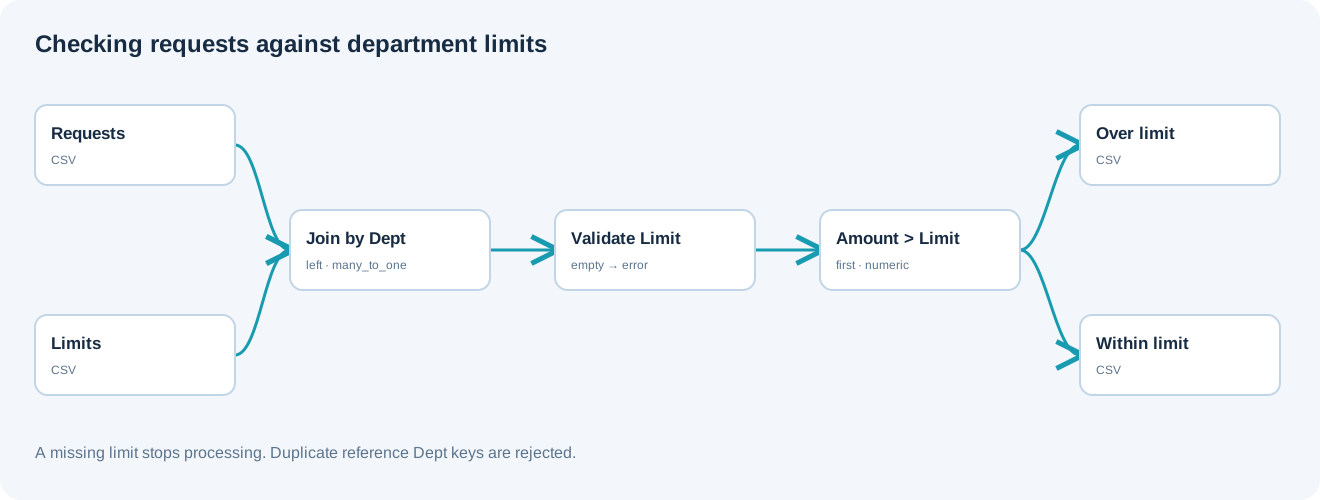
Example 11 topology: 7 blocks, 6 connections. Node identifiers and ports from the configured graph are preserved.
Graph: requests and limits → Join by Dept → required-limit validation → routing Amount > Limit → two results. Use a left join with many_to_one so duplicate reference rows cannot multiply requests. Join fields have r. and l. prefixes.
{
  "version": 3,
  "nodes": [
    {
      "id": "requests",
      "type": "file",
      "label": "Requests",
      "config": {
        "role": "source",
        "source_id": "demo_requests",
        "options": {
          "sheet": "CSV",
          "range": "A1:C4",
          "header": true,
          "delimiter": ";"
        }
      }
    },
    {
      "id": "limits",
      "type": "file",
      "label": "Limits",
      "config": {
        "role": "source",
        "source_id": "demo_limits",
        "options": {
          "sheet": "CSV",
          "range": "A1:B3",
          "header": true,
          "delimiter": ";"
        }
      }
    },
    {
      "id": "join",
      "type": "join",
      "label": "Department limit",
      "config": {
        "inputs": [
          {
            "id": "requests",
            "alias": "r"
          },
          {
            "id": "limits",
            "alias": "l",
            "how": "left",
            "keys": [
              {
                "left": "r.Dept",
                "right": "Dept"
              }
            ],
            "cardinality": "many_to_one"
          }
        ]
      }
    },
    {
      "id": "quality",
      "type": "quality",
      "label": "Limit required",
      "config": {
        "rules": [
          {
            "fields": [
              "l.Limit"
            ],
            "condition": "empty",
            "action": "error"
          }
        ]
      }
    },
    {
      "id": "router",
      "type": "router",
      "label": "Limit check",
      "config": {
        "route_type": "conditions",
        "mode": "first",
        "default_route": true,
        "routes": [
          {
            "id": "over",
            "label": "Over limit",
            "predicates": [
              {
                "column": "r.Amount",
                "op": "gt",
                "numeric": true,
                "value_mode": "field",
                "value_field": "l.Limit"
              }
            ]
          }
        ]
      }
    },
    {
      "id": "over_out",
      "type": "export",
      "label": "Over limit",
      "config": {
        "format": "csv",
        "filename": "over_limit",
        "destination": "download",
        "delimiter": ";",
        "timezone": "Europe/Kyiv"
      }
    },
    {
      "id": "within_out",
      "type": "export",
      "label": "Within limit",
      "config": {
        "format": "csv",
        "filename": "within_limit",
        "destination": "download",
        "delimiter": ";",
        "timezone": "Europe/Kyiv"
      }
    }
  ],
  "edges": [
    {
      "source": "requests",
      "target": "join",
      "source_port": "out",
      "target_port": "requests"
    },
    {
      "source": "limits",
      "target": "join",
      "source_port": "out",
      "target_port": "limits"
    },
    {
      "source": "join",
      "target": "quality",
      "source_port": "out",
      "target_port": "in"
    },
    {
      "source": "quality",
      "target": "router",
      "source_port": "out",
      "target_port": "in"
    },
    {
      "source": "router",
      "target": "over_out",
      "source_port": "over",
      "target_port": "in"
    },
    {
      "source": "router",
      "target": "within_out",
      "source_port": "else",
      "target_port": "in"
    }
  ]
}
Expected result
over_limit.csv contains R2 (600 > 500) and R3 (1200 > 1000). within_limit.csv contains R1 (900 ≤ 1000). The result includes the joined limit; request fields have the r. prefix and reference fields the l. prefix.
Run and verify
- Register both CSVs and ensure one limit per Dept.
- Build the JSON graph; select requests as the main Join input and limits as a left join by Dept.
- Inspect l.Limit and the error rule for missing limits.
- Check the three requests: R1 within limit, R2 and R3 over limit.
- Add Dept=FIN without a limit: quality validation must stop before export.
Troubleshooting
- Use the exact post-Join names r.Amount and l.Limit.
- Repeated Dept values violate many_to_one; correct the reference table.
- Do not replace a missing limit with zero without a business rule.
- Routing compares current-row fields; no former reference input is needed.