Purpose
Explicitly defines each output-table column: its name, source and order. Useful for preparing a required export or form structure. The saved cube-mapping mode is supported for compatibility, but normal cube configuration is performed in the target block.
Inputs and outputs
One input, in, and one output, out. Table mode preserves the row count. The output of the legacy cube mode must go directly to an IBM target.
Parameters
| Parameter | Settings and values | Options and limits |
|---|---|---|
mode | columns means table mapping; cube means saved cube mapping. The editor creates new blocks in columns mode. | Options: cube, columnsDefault: cube |
spec | Cube rules for cube mode; include dimensions and the value field. | Default: not set |
columns | Output fields: name, kind=column/constant, value — the source field or a constant text value. | Count: 0–256 |
Step-by-step configuration
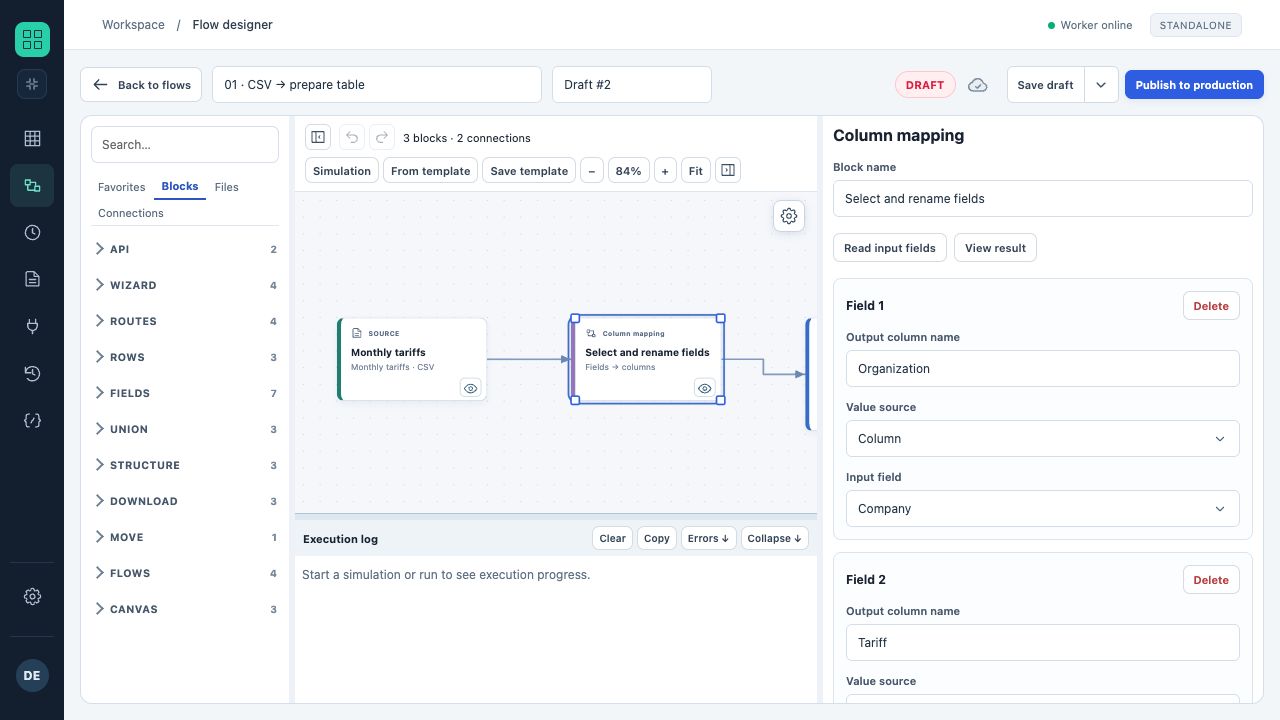
The “Column mapping” block takes Company from the input table and names the output field “Organisation”; the next field is configured for the tariff.
- Add the block and read the input fields.
- Create one rule for each required output column.
- Enter the new name; select an input column or a constant value.
- Arrange the rules in the required order and check the output.
Rules and diagnostics
- Only explicitly listed columns appear in the result.
- Output field names must be unique; a missing source field stops the block.
- A constant value in this block is text. For typed numbers, dates or Boolean values, use “Set field values”.
- In the supported legacy cube mode, additional transformations after mapping are prohibited; the editor moves this mapping into the target when reopened.
Configuration example
Build the fields SKU ← ProductCode, Amount ← Value, Scenario ← constant Budget. The output will contain exactly these three columns in the specified order.