Task and prerequisites
Normalize product codes to one spelling and retain the last record for each code.
This example uses demonstration data and settings. Validate the expected result in your own environment before connecting production destinations. Identifiers demo_* are illustrative: select your own training connections or sources in the editor. The JSON below shows the block and connection structure, not a ready-to-transfer flow archive.
Training input data
products.csv
SKU;Name
  t01 ;Tea old
T01;Tea new
 c01;Coffee
Blocks, connections and exact settings
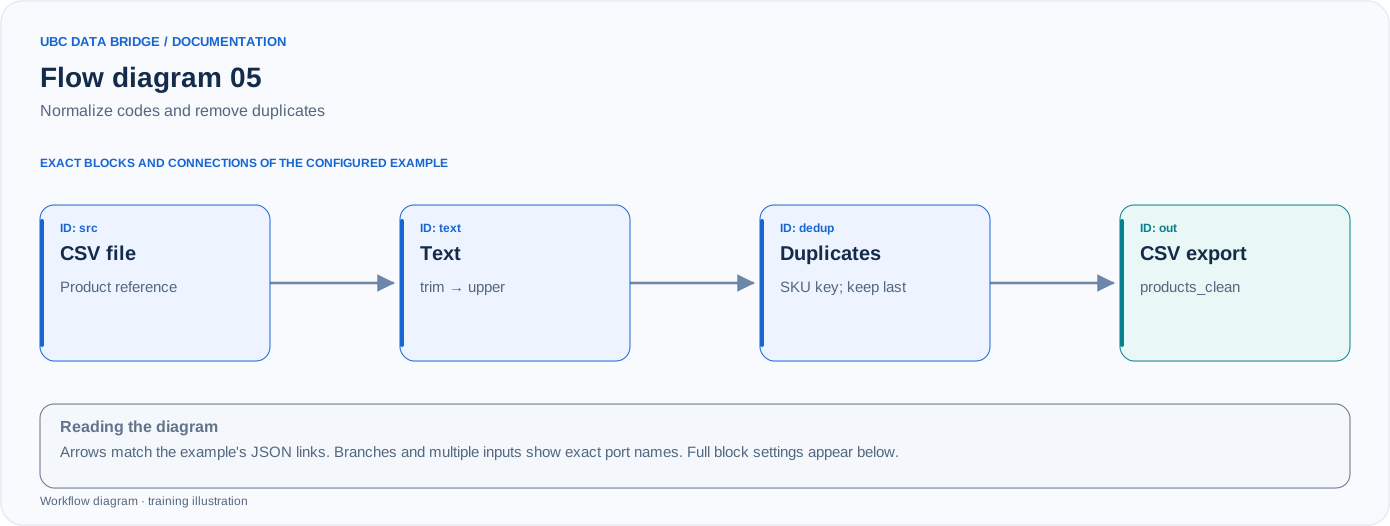
Example 05 topology: 4 blocks, 3 connections. Node identifiers and ports from the configured graph are preserved.
Add the listed blocks in the designer, open each block's properties and set these values. Names demo_* identify training sources and connections.
| Block | Setting |
|---|---|
| 1 File src |
|
| 2 Text transformation text |
|
| 3 Deduplication dedup |
|
| 4 Data export out |
|
Port connections
- src
out→ textin - text
out→ dedupin - dedup
out→ outin
Complete graph configuration as JSON
{
  "version": 3,
  "nodes": [
    {
      "id": "src",
      "type": "file",
      "label": "src",
      "config": {
        "role": "source",
        "source_id": "demo_products",
        "options": {
          "sheet": "CSV",
          "range": "A1:B4",
          "header": true,
          "delimiter": ";"
        }
      }
    },
    {
      "id": "text",
      "type": "text",
      "label": "text",
      "config": {
        "fields": [
          "SKU"
        ],
        "operations": [
          {
            "kind": "trim"
          },
          {
            "kind": "upper"
          }
        ],
        "null": "preserve"
      }
    },
    {
      "id": "dedup",
      "type": "deduplicate",
      "label": "dedup",
      "config": {
        "keys": [
          "SKU"
        ],
        "keep": "last",
        "comparison": "text",
        "case_sensitive": true,
        "trim": false
      }
    },
    {
      "id": "out",
      "type": "export",
      "label": "out",
      "config": {
        "format": "csv",
        "filename": "products_clean",
        "destination": "download",
        "delimiter": ";",
        "timezone": "Europe/Kyiv"
      }
    }
  ],
  "edges": [
    {
      "source": "src",
      "target": "text",
      "source_port": "out",
      "target_port": "in"
    },
    {
      "source": "text",
      "target": "dedup",
      "source_port": "out",
      "target_port": "in"
    },
    {
      "source": "dedup",
      "target": "out",
      "source_port": "out",
      "target_port": "in"
    }
  ]
}
Expected result
| SKU | Name |
|---|---|
| T01 | Tea new |
| C01 | Coffee |
Two of the 3 input rows remain. “Last” means last in the current input order, not the latest by date.
Run and verify
- Upload products.csv without manually removing spaces first.
- Operation order: trim, then upper, then deduplicate by SKU.
- Verify that Tea old was removed, Tea new remains and c01 became C01.
Common errors
- Deduplicating before normalization would preserve both t01/T01 variants.
- keep=unique would remove every row with a repeated key; that is a different task.
- If source ordering is unstable, keep=last does not guarantee the newest business record.