Task and prerequisites
Unpivot months in a budget workbook and write four values to a training cube with explicit mapping of every dimension.
This example uses demonstration data and settings. Validate the expected result in your own environment before connecting production destinations. Identifiers demo_* are illustrative: select your own training connections or sources in the editor. The JSON below shows the block and connection structure, not a ready-to-transfer flow archive.
Training input data
| Product | Jan | Feb |
|---|---|---|
| Tea | 100 | 120 |
| Coffee | 80 | 90 |
Blocks, connections and exact settings
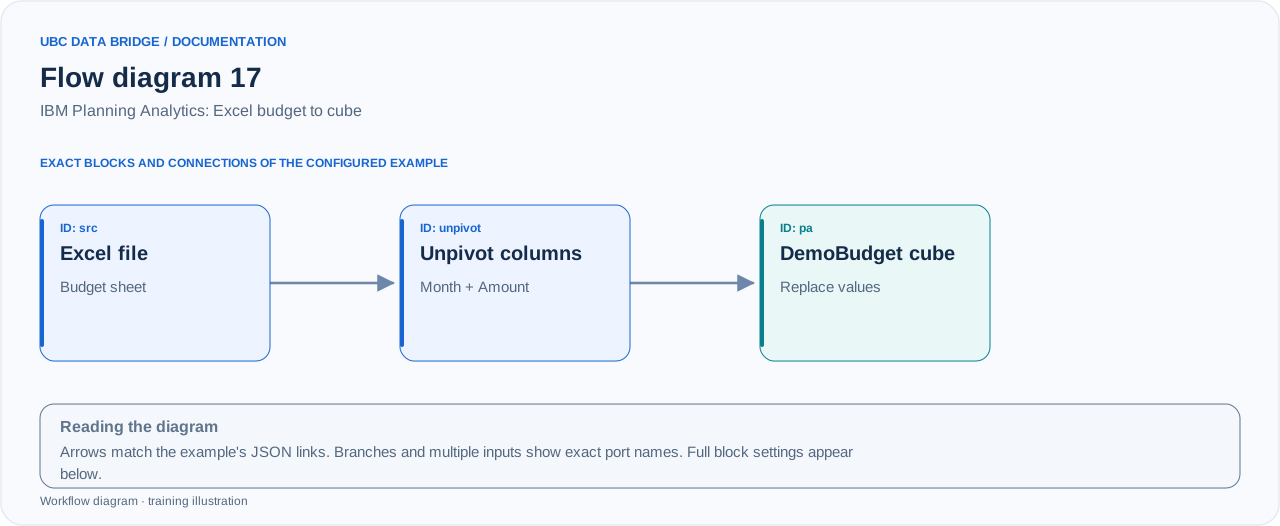
Example 17 topology: 3 blocks, 2 connections. Node identifiers and ports from the configured graph are preserved.
Add the listed blocks in the designer, open each block's properties and set these values. Names demo_* identify training sources and connections.
| Block | Setting |
|---|---|
| 1 File src |
|
| 2 Unpivot columns unpivot |
|
| 3 Connection pa |
|
Port connections
- src
out→ unpivotin - unpivot
out→ pain
Complete graph configuration as JSON
{
  "version": 3,
  "nodes": [
    {
      "id": "src",
      "type": "file",
      "label": "src",
      "config": {
        "role": "source",
        "source_id": "demo_pa_budget",
        "options": {
          "sheet": "Budget",
          "range": "A1:C3",
          "header": true
        }
      }
    },
    {
      "id": "unpivot",
      "type": "unpivot",
      "label": "unpivot",
      "config": {
        "id_columns": [
          "Product"
        ],
        "period_column": "Month",
        "unpivot_value_column": "Amount"
      }
    },
    {
      "id": "pa",
      "type": "connection",
      "label": "pa",
      "config": {
        "role": "target",
        "connection_id": "demo_pa",
        "object_type": "cube",
        "cube": "DemoBudget",
        "target_mode": "write",
        "mapping": {
          "bindings": [
            {
              "dimension": "Year",
              "hierarchy": "Year",
              "kind": "constant",
              "value": "2026"
            },
            {
              "dimension": "Month",
              "hierarchy": "Month",
              "kind": "column",
              "value": "Month"
            },
            {
              "dimension": "Product",
              "hierarchy": "Product",
              "kind": "column",
              "value": "Product"
            },
            {
              "dimension": "Scenario",
              "hierarchy": "Scenario",
              "kind": "constant",
              "value": "Budget"
            },
            {
              "dimension": "Measure",
              "hierarchy": "Measure",
              "kind": "constant",
              "value": "Revenue"
            }
          ],
          "value_column": "Amount",
          "value_type": "number",
          "decimal": ".",
          "blank": "error",
          "duplicates": "error",
          "portion_cells": 10000,
          "response_seconds": 120
        },
        "cube_write": {
          "mode": "replace"
        }
      }
    }
  ],
  "edges": [
    {
      "source": "src",
      "target": "unpivot",
      "source_port": "out",
      "target_port": "in"
    },
    {
      "source": "unpivot",
      "target": "pa",
      "source_port": "out",
      "target_port": "in"
    }
  ]
}
Expected result
| Year | Month | Product | Scenario | Measure | Value |
|---|---|---|---|---|---|
| 2026 | Jan | Tea | Budget | Revenue | 100 |
| 2026 | Feb | Tea | Budget | Revenue | 120 |
| 2026 | Jan | Coffee | Budget | Revenue | 80 |
| 2026 | Feb | Coffee | Budget | Revenue | 90 |
Four cells receive values 100, 120, 80 and 90. Replace sets the values of these specific cells. Cube pre-clearing is not enabled.
Run and verify
- In training cube DemoBudget, create dimensions Year, Month, Product, Scenario and Measure with the illustrated elements; use writable leaf elements.
- Upload the Excel file and pre-validate mapping: 4 coordinates, no unknown elements or duplicates.
- Run the write to the training cube; check the cells in IBM PA and a total of 390.
- Repeat the flow with the same data: replace should preserve the same values rather than double the budget.
Common errors
- If the cube has an additional dimension, it must also be mapped.
- Month/Jan/Feb and Product/Tea/Coffee names must match actual elements or mapping tables.
- mode=add adds to current cells and can double values on repetition; replace is explicitly selected here.
- With duplicates=error, a repeated coordinate must be corrected or deliberately aggregated before writing.